
Sequence
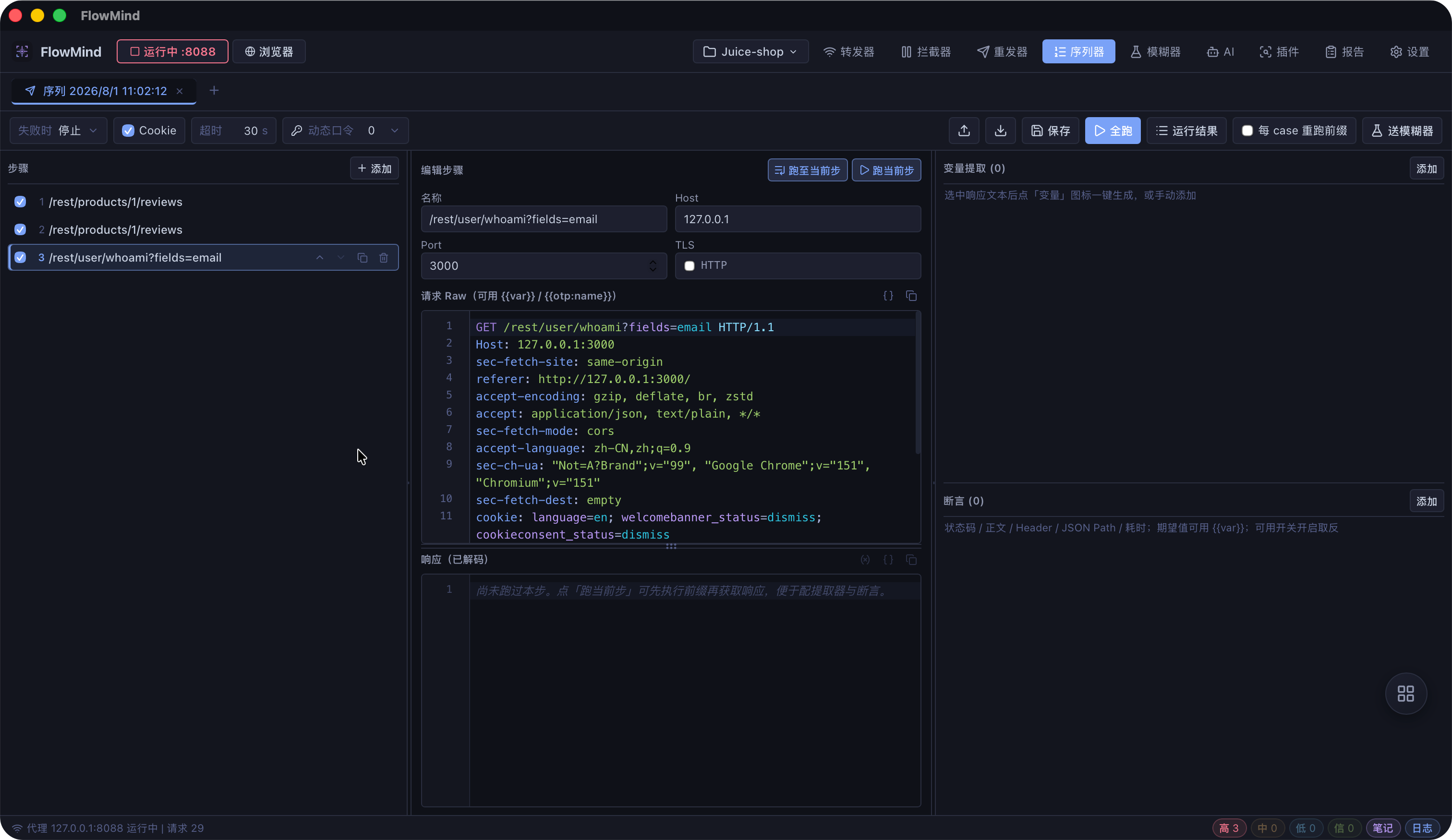
The Sequence tool orchestrates multiple requests and executes them in order, extracting data from one step's response to feed subsequent requests. It's ideal for testing multi-step business logic and complex API workflows.
Overview
- Multi-step orchestration: Chain multiple requests and run them in order
- Variable extraction: Pull tokens, IDs, and other data from responses
- Variable passing: Inject extracted values into later steps' params, headers, or body
- Conditional control: Branch execution based on response results
- Import & export: Import requests from Repeater or proxy traffic; export sequences
Interface Layout
The Sequence editor organizes requests as steps within a sequence:
mermaid
flowchart LR
    Seq[Sequence List] --> Step[Request Step]
    Step --> Var[Variable Extraction]
    Var --> Next[Later Steps]
    Next --> Run[Run Sequence]
Run --> Result[Results Panel]Create a Sequence
- Click New Sequence on the Sequence page
- Enter a name (e.g. "register-login-checkout")
- Add request steps in business order
Add Request Steps
- Right-click a request in Forwarder → Send to Sequence
- Right-click a Repeater tab → Send to Sequence
- Click + in the sequence to create manually
Variable Extraction & Passing
Extract Variables
Values can be extracted from each step's response:
| Source | Example |
|---|---|
| Response header | Session ID from Set-Cookie |
| Response body | JSON field such as data.token |
| Regex extraction | Custom regex captures |
Reference Variables
Reference variables in later steps using syntax:
POST /api/order HTTP/1.1
Host: example.com
Authorization: Bearer {{token}}
Content-Type: application/json

{"productId": 1, "quantity": 2}Run a Sequence
- Click Run (or
Ctrl/⌘ + Enter) - Requests are sent sequentially in step order
- Each step's result appears in the results panel
Run Options
| Option | Description |
|---|---|
| Loop count | Repeat the entire sequence |
| Pause interval | Delay between steps (ms) |
| Stop on failure | Halt execution after a failed step |
View Results
The results panel shows per step:
- Request and response messages
- Status code and response time
- Extracted variable values
- Execution order and timing
Import & Export
Sequences can be exported to JSON or imported for reuse. They can also be sent to the Fuzzer for multi-step workflow fuzzing.
Use Cases
Multi-step Business Flow Testing
1. Capture the login request
2. Extract the token from the response
3. Inject the token into subsequent business requests
4. Execute the full business flow in order
5. Verify for privilege escalation or logic flawsPermission Chain Verification
1. Steps cover create → view → modify → delete
2. Compare step outcomes across user roles
3. Identify horizontal/vertical privilege escalationEnvironment Switching
1. Configure different Host values per environment
2. Run the same sequence in each environment
3. Compare per-step response differencesKeyboard Shortcuts
| Shortcut | Function |
|---|---|
Ctrl/⌘ + Enter | Run sequence |
Ctrl/⌘ + N | New sequence |
Ctrl/⌘ + S | Save sequence |
Ctrl/⌘ + W | Close current sequence |