
Plugins
Plugins is the security detection core of FlowMind. All scan rules and tag scripts are managed here. The Plugins page has three tabs: Rules (passive scanning), Scan (active scanning), and Tags (request tagging scripts).
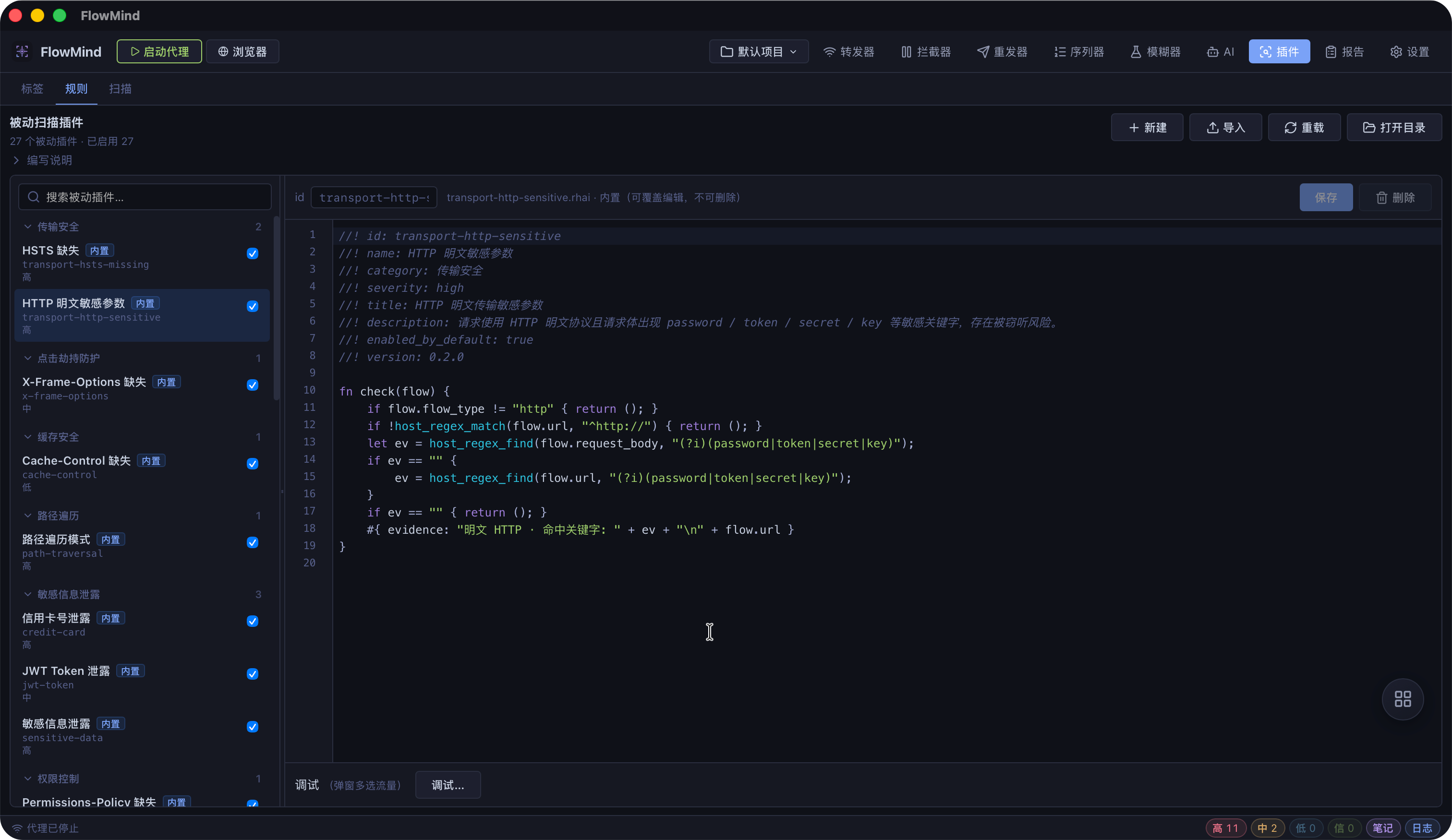
Overview
- Rule Management: View, create, edit, and delete passive scan rule scripts
- Scan Management: View, create, edit, and delete active scan rule scripts
- Tag Scripts: Write Rhai functions to automatically tag requests
- Hot Reload: Reload scripts with one click, no restart needed
- Rule Debugging: Select a Flow to test rule output
- Project Configuration: Enable/disable rules per project
Page Layout
The Plugins page has three tabs:
| Tab | Description |
|---|---|
| Rules | Passive scan scripts (plugins/scanner/passive/) |
| Scan | Active scan scripts (plugins/scanner/active/) |
| Tags | Tag scripts |
Rules (Passive Scanning)
Manage passive scanning rules stored as .rhai files in plugins/scanner/passive/.
Rule List
- Built-in Rules: Compiled into the binary, auto-extracted on first launch, read-only
- Workspace Rules: User-created, editable, deletable, renamable
- Status Indicator: Shows whether a rule is enabled and its metadata
Actions
| Action | Description |
|---|---|
| Enable/Disable | Toggle rule status |
| Edit | Open script editor |
| Create | New rule file in workspace |
| Delete | Delete workspace rule |
| Reload | Reload all scripts |
| Debug | Test rule output against a selected Flow |
Execution Flow
flowchart LR
    Traffic[Traffic Capture] --> Engine[Passive Scan Engine]
    Engine --> Rules[Rule Matching]
    Rules --> Findings[Security Findings]
    Findings --> Store[Finding Storage]
Store --> Drawer[Findings Panel]Passive scanning runs automatically during traffic capture. Rules check all HTTP/HTTPS and WebSocket traffic.
Built-in Rules
28 built-in passive scanning rules, all enabled by default, covering OWASP Top 10 risks.
Scan (Active Scanning)
Manage active scanning rules stored as .rhai files in plugins/scanner/active/.
Execution Flow
flowchart LR
    Traffic[Traffic Capture] --> Dispatcher[Scan Dispatcher]
    Dispatcher --> RateLimit[Rate Limiting]
    RateLimit --> Probe[Probe Requests]
    Probe --> Detect[Payload Detection]
Detect --> Findings[Security Findings]Active scanning runs concurrently during traffic capture (disabled by default, must be enabled in project settings).
Built-in Rules
8 built-in active scanning rules, all disabled by default.
Tag Scripts
Tag scripts are Rhai functions that automatically tag captured requests.
Use Cases
- Endpoint Classification: Tag API endpoints by URL pattern
- Sensitive Operations: Identify requests involving sensitive operations
- Tech Stack Recognition: Tag based on response headers
- Custom Annotations: Project-specific tagging logic
Function Format
Tag scripts export a fn tag(flow) function that returns an array of strings:
fn tag(flow) {
    let tags = [];
    if host_url_match(flow, "/api/admin") {
        tags.push("admin");
    }
    if host_url_match(flow, "(?i)(login|auth|token)") {
        tags.push("auth");
    }
    if host_header_absent(flow, "req", "authorization") {
        tags.push("no-auth");
    }
    tags
}Script Editor
All rules and tag scripts share the same editor with:
- Syntax Highlighting: Rhai script highlighting
- Code Folding: Fold/unfold code blocks
- Error Reporting: Real-time compilation errors
- Debug Output: Execution result preview
Project Configuration
- Go to Settings → Project Settings to enable/disable rules
- Active rules are disabled by default
- Rule configuration is per-project
Viewing Findings
Findings can be viewed through:
- Status Bar Findings Panel: Quick access to recent findings
- Reports Page: Browse and manage all findings in the Findings tab
Built-in Rules
Passive Rules (28, all enabled by default)
| Rule ID | Name | Detection | Severity |
|---|---|---|---|
sensitive-data | Sensitive Data Leak | Phone, ID, email, secrets | High |
credit-card | Credit Card Leak | Visa/MasterCard/Amex numbers | High |
transport-http-sensitive | HTTP Plaintext Sensitive Params | password/token/secret in plaintext | High |
transport-hsts-missing | HSTS Missing | No HSTS header on HTTPS | High |
certificate | Certificate Issues | Self-signed or expired cert | High |
sqli-pattern | SQL Injection Pattern | UNION SELECT, OR 1=1 patterns | High |
path-traversal | Path Traversal | ../ or ..\ patterns | High |
api-key-in-url | API Key in URL | api_key in query params | High |
websocket-ws-sensitive | WebSocket Plaintext Sensitive Info | password/token in ws:// | High |
websocket-ws-plaintext | WebSocket Plaintext Connection | ws:// protocol | High |
cookie-security | Cookie Security Missing | No HttpOnly/Secure/SameSite | Medium |
cors | Insecure CORS | ACAO: * + ACAC: true | Medium |
csp | Weak CSP | unsafe-inline, unsafe-eval, * | Medium |
x-frame-options | X-Frame-Options Missing | Clickjacking risk | Medium |
jwt-token | JWT Token Leak | eyJ-prefixed tokens in body | Medium |
stack-trace | Stack Trace Leak | Debug stack in response | Medium |
debug-page | Debug Page Exposure | Flask debug, PHPInfo, Spring Boot error | Medium |
directory-listing | Directory Listing | Index of / listing | Medium |
open-redirect | Open Redirect | Location to external domain | Medium |
host-header-injection | Host Header Injection | Response reflects Host header | Medium |
xss-reflection | XSS Reflection | Unencoded <script> or event handlers | Medium |
content-type | Content-Type Missing | No X-Content-Type-Options | Low |
info-leak | Server Info Leak | Server/X-Powered-By headers | Low |
internal-ip | Internal IP Leak | RFC1918 IP in response | Low |
referrer-policy | Referrer-Policy Missing | No Referrer-Policy header | Low |
permissions-policy | Permissions-Policy Missing | No feature policy header | Low |
cache-control | Cache-Control Missing | Sensitive pages without cache control | Low |
x-xss-protection | X-XSS-Protection Missing | Missing XSS filter header | Low |
Active Rules (8, all disabled by default)
| Rule ID | Name | Detection Method | Severity |
|---|---|---|---|
active-sqli-error | SQL Injection (Error) | Append quote payload, detect DB errors | High |
active-cmd-injection | Command Injection | Append echo canary, detect echo | High |
active-path-traversal | Path Traversal | Replace with ../etc/passwd | High |
active-ssrf | SSRF | Inject internal address, detect connection | High |
active-xss-reflect | XSS Reflection | Append unique probe, detect echo | Medium |
active-open-redirect | Open Redirect | Inject external probe domain, detect redirect | Medium |
active-ssti | SSTI | Append arithmetic expression, detect eval result | Medium |
active-error-disclosure | Error Disclosure | Inject malformed input, compare baseline | Low |
Plugin Development
All scan rules use the Rhai scripting language. See:
Troubleshooting
Rules Not Triggering
- Check if rules are enabled in the project
- Verify the proxy is running and capturing traffic
- Passive rules trigger automatically; active rules need traffic
- Check scan logs
Script Load Failure
- Check
.rhaifile format and syntax - Verify metadata header (
//!) format - Check app logs for compilation errors
- Click Reload to refresh
Performance Issues
- Reduce number of enabled rules
- Return early in scripts to minimize regex
- Adjust active scan concurrency limits
- Periodically clean historical Flow data